Posting on your Google Business Profile keeps your listing fresh, shows customers what is new and gives them a reason to call or visit. However, many owners stop posting because they run out of ideas. Here are 30 practical Google Business Profile post ideas for shops, clinics, restaurants, salons, schools and service businesses, with simple tips to make each post work.
Types of Google Business Profile Posts
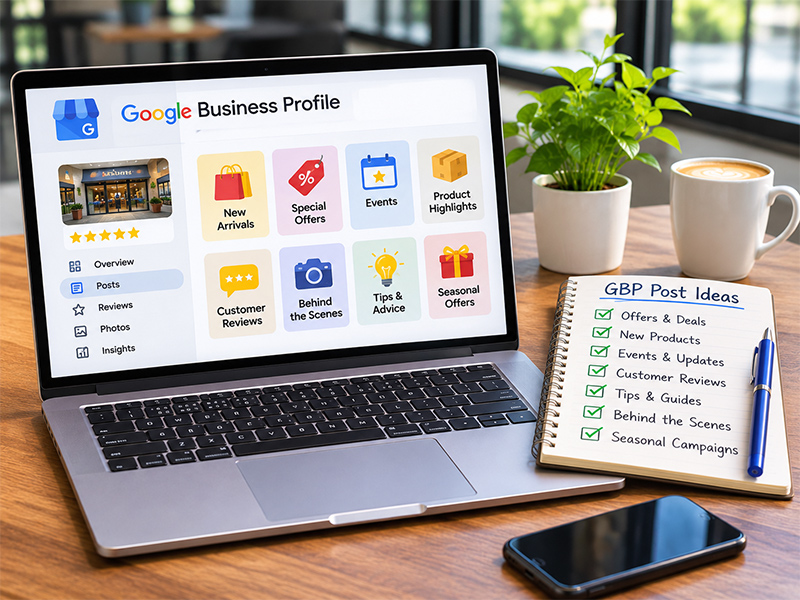
Before using the Google Business Profile post ideas below, it helps to know the post formats available.
According to Google’s help guide on posts, you can publish three main types:
- Updates: general news with a photo or video and a button, such as Call or Book.
- Offers: a promotion with a title, start and end dates, and optional coupon code.
- Events: an event with a title and dates.
Google also notes that posts older than six months are archived unless they have a date range. So, regular posting keeps your profile active.
30 Google Business Profile Post Ideas
Products and Services
- Service spotlight: explain one service, who it is for and the price range.
- New product launch: share a photo and the key benefit.
- Best seller of the month: show your most popular item.
- Before and after: ideal for salons, clinics, painters and interior designers.
- Price list or menu update: link to the full page on your website.
- Package or combo deal: for example, a festive gift hamper.
Offers and Seasonal Posts
- Festival offer: Diwali, Lohri, Baisakhi, Gurpurab, Christmas or New Year deals.
- Weekend special: limited-time discounts for slow days.
- First-visit discount: attract new customers.
- Wedding season offer: perfect for jewellers, boutiques, caterers and photographers.
- Back-to-school offer: stationery, uniforms, coaching and tuition.
- Referral reward: thank customers who bring friends.
Need festival inspiration? See our festival post design calendar.
Trust and Social Proof
- Customer review highlight: share a review with permission.
- Case study: a short story of a problem you solved.
- Awards and certifications: show registrations, licences or awards.
- Meet the team: introduce a staff member with a photo.
- Behind the scenes: your kitchen, workshop or process.
- Milestone: years in business or customers served.
Helpful Tips and FAQs
- Answer a common question: such as “How long does delivery take?”
- Quick tip: a care tip, health tip or maintenance tip.
- Myth vs fact: clear up a common misunderstanding.
- How-to: three simple steps related to your service.
- Buying guide: how to choose the right product.
- Blog post share: link to a helpful article on your website.
Events and Updates
- Event announcement: workshops, open days or tastings.
- Holiday hours: special timings for festivals and public holidays.
- New location or branch: with directions and opening date.
- Community activity: a charity drive or local sponsorship.
- New booking or delivery option: such as WhatsApp ordering.
- Job opening: hiring posts also show that your business is growing.
Tips to Make Your Posts Work Better
Good Google Business Profile post ideas only work when the post itself is clear. Follow these tips:
- Use real photos: clear photos of your products, team and premises work better than stock images.
- Keep it short: the first line matters most, so state the offer or news clearly.
- Add a button: choose Call, Book, Order online or Learn more.
- Mention your area naturally: for example, “now open on Lawrence Road, Amritsar”.
- Post regularly: one or two posts a week is a good rhythm.
- Avoid phone numbers in the text: Google may reject posts with phone numbers it cannot verify, so use the Call button instead.
A Simple Monthly Posting Plan
Turn these Google Business Profile post ideas into a routine with a simple weekly mix:
| Week | Post type | Example |
|---|---|---|
| Week 1 | Service spotlight | “Full-body check-up packages now available” |
| Week 2 | Offer | “10% off this weekend” |
| Week 3 | Trust post | Customer review or team photo |
| Week 4 | Tip or FAQ | “3 ways to keep your AC running efficiently” |
Do Google Business Profile Posts Help Rankings?
Posts are not a magic ranking factor. However, they keep your profile active, give customers useful information and can increase calls and clicks. Combined with complete details, photos and reviews, they support your overall local visibility. For the full picture, use our Google Business Profile checklist.
Final Thoughts
Save these Google Business Profile post ideas and plan one month at a time. Mix offers, trust posts and helpful tips, and always add a clear button. If you would rather focus on your business, our Google Business Profile management service handles posts, photos, reviews and updates for you.
Frequently Asked Questions
What can I post on my Google Business Profile?
You can publish updates, offers and events. Updates can include a photo or video and a button such as Call, Book or Learn more.
How often should I post on Google Business Profile?
One or two posts a week is a good rhythm for most local businesses.
Do Google Business Profile posts expire?
Google says posts older than six months are archived unless a date range is set, such as for offers and events.
Can I add a phone number in a Google post?
It is better to use the Call button. Google may reject posts that include phone numbers it cannot verify.
Do Google posts improve local rankings?
They are not a direct ranking boost, but they keep your profile active and can increase calls, clicks and visits.
Want your Google Business Profile managed for you? Call +91-9814052984 or contact Duggal Infotech today.