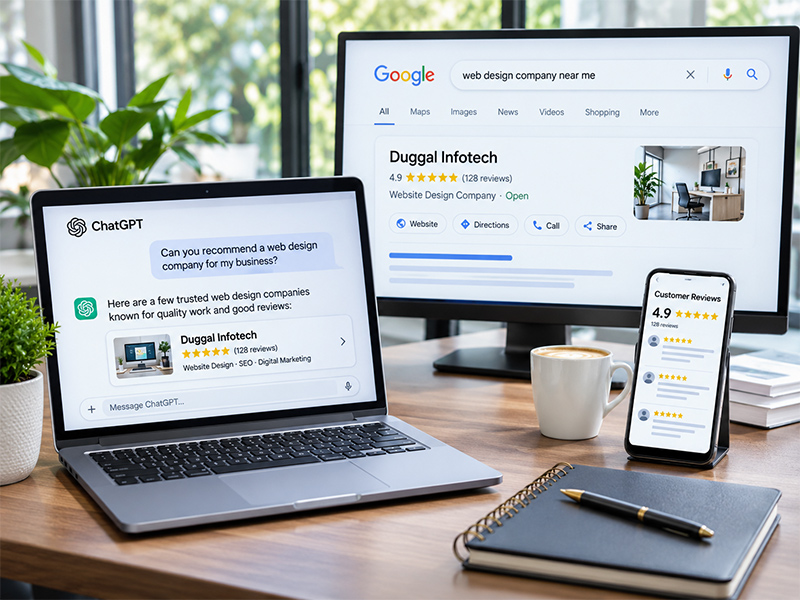
More customers now ask AI tools for advice, such as “best dentist in Amritsar” or “who can design a website for my shop”. If your business is not mentioned in those answers, you miss out. This step-by-step guide explains how to get recommended by ChatGPT and Google AI features such as AI Overviews and AI Mode, using honest methods that also improve your normal SEO.
How AI Assistants Choose Which Businesses to Recommend
AI assistants do not pick businesses at random. When they search the web, they look for sources that clearly answer the question and that other sites trust. In practice, they rely on:
- Your website: clear service pages, location details and FAQs.
- Search indexes: pages that are crawled and indexed by search engines.
- Business listings: Google Business Profile, Bing Places and directories.
- Reviews and mentions: what customers and other websites say about you.
Google confirms that its AI features use the same core signals as Search. Its guide on AI features and your website says there are no special tricks beyond good SEO and helpful content.
Step 1: Make Sure AI Crawlers Can Access Your Site
First, check your robots.txt file. OpenAI uses a crawler called OAI-SearchBot to find pages for ChatGPT search. According to OpenAI’s crawler documentation, sites that block OAI-SearchBot will not appear in ChatGPT search answers. Note that GPTBot is a different crawler used for model training, so you can manage the two separately.
Also, make sure Google can crawl and index your pages. Use Google Search Console to fix indexing errors.
Step 2: Build Clear, Specific Service Pages
To get recommended by ChatGPT, your pages must state facts plainly. AI tools prefer this style. For each service, create one page that says:
- What you offer, in the first two lines.
- Where you serve, such as “Amritsar and nearby areas”.
- Prices or price ranges, if possible.
- Who it is for, and what makes you different.
- Common questions with short, direct answers.
A vague page like “We provide quality services” gives AI nothing to quote.
Step 3: Keep Your Business Details Consistent Everywhere
Use the same business name, address and phone number on your website, Google Business Profile, Bing Places, Facebook, Justdial and other listings. Consistency helps both search engines and AI assistants trust that the information is correct. Our Google Business Profile checklist walks you through the key settings.
Step 4: Earn More Genuine Reviews
Reviews tell AI tools what customers actually think. Ask happy customers to mention the service and location in their review, for example “great root canal treatment in Amritsar”. Reply to every review politely. Read our tips to get more Google reviews.
Step 5: Get Mentioned on Trusted Websites
AI answers often draw from “best of” lists, local news, industry directories and comparison articles. Therefore, if you want to get recommended by ChatGPT, aim to be featured where your customers already look:
- Local news and business features in Punjab.
- Industry associations and trade directories.
- Partner websites, suppliers and event pages.
- Honest comparison or listicle articles in your niche.
Step 6: Add Structured Data
Schema markup labels your content for machines. Add LocalBusiness, Service and FAQ schema to relevant pages. It does not guarantee a mention, but it makes your details easier to understand. See the LocalBusiness type on Schema.org.
Step 7: Publish Helpful Answers, Not Fluff
Write blog posts that answer real customer questions with facts, numbers and local examples. For instance, a clinic could explain treatment costs in Punjab, while a cafe could share its menu and timings. Helpful content is what both Google and ChatGPT want to cite.
Step 8: Track Your AI Visibility
Finally, measure progress. ChatGPT adds utm_source=chatgpt.com to links it sends, so you can see this traffic in Google Analytics. In addition, test common questions in ChatGPT, Gemini and Google AI Mode every month and note whether you appear. You can also follow our guide to track AI search visibility in Search Console.
What Not to Do
- Do not create fake reviews or fake listings.
- Do not stuff pages with keywords for AI.
- Do not publish thin AI-written pages with no real information.
- Do not block search crawlers if you want to be found.
How Long Does It Take to Get Recommended by ChatGPT?
There is no fixed timeline. Fixing crawl access and listings can help within weeks, while reviews, mentions and content build up over months. Consistency matters more than speed.
Final Thoughts
You cannot pay to get recommended by ChatGPT, and no one can guarantee it. However, you can make your business the clearest, most trusted answer for your area and service. That same work improves your Google rankings too. To learn more, read our guide to generative engine optimization or explore our GEO services.
Frequently Asked Questions
Can I pay to get recommended by ChatGPT?
No. ChatGPT does not sell placement in its answers. You improve your chances through clear content, consistent listings, reviews and mentions on trusted websites.
Do I need to allow OAI-SearchBot?
Yes, if you want to appear in ChatGPT search answers. OpenAI says sites that block OAI-SearchBot will not appear in its search answers.
Does SEO help with Google AI Overviews?
Yes. Google says its AI features rely on the same core Search signals, so good SEO and helpful content are the foundation.
How can I track traffic from ChatGPT?
ChatGPT adds utm_source=chatgpt.com to the links it sends, so you can see this traffic in Google Analytics.
How long does it take to appear in AI answers?
It varies. Technical fixes can help within weeks, while reviews, mentions and content usually take a few months to build up.
Want your business to show up in AI answers? Call +91-9814052984 or contact Duggal Infotech for an AI visibility review.